Published
Outcome
Six rules for what AI generates and what stays real turned an inaccurate first batch into product-accurate launch, campaign and ad visuals for a lip brand.
Category
Product
Product
AI-Generated Content for Social Media: What We Learned Making It for a Beauty Brand
Written by
Ella S.

AI can give a brand a month of visuals in a few days. For most categories, that is the whole promise.
Beauty is different. In beauty, the product is the content. A gloss with the wrong cap is not a creative choice. It is a different product. A shade that looks a little darker on screen is a return, a bad review and a customer who does not come back.
We learned this in practice, working with Sol Cosmetics on social media and website visuals for their lip line, Sol d'Amore. This article is what we do now, and why.
What is AI-generated content for social media?
AI-generated content is imagery made or edited with generative models instead of, or together with, a photoshoot. For social media it usually means feed posts, stories, carousels, ad creatives and banners.
In practice it is rarely "type a prompt, get a post". The useful work is a mix: real product photos, real model photos, generated scenes, light and props, AI retouching, and a designer who sets the type, checks every detail and exports each format.
The model makes images. The team decides what is true.

The project
Sol d'Amore is a lip brand with 3 lines: lip glosses, creamy lip liners and gloss and liner combos. We designed the e-commerce website, in English and Arabic, and built the Instagram account from scratch before launch: highlight covers, a first grid of posts, a delivery card and an email template.
After launch the work became ongoing. Seasonal campaign posts, a National Day offer in Arabic, website banners for a Breast Cancer Awareness campaign, and vertical ad creatives for Snapchat and Instagram.
Almost all of it used AI somewhere. Not all of it the same way.
What went wrong in the first batch
The first launch visuals, highlight covers and posts, relied too much on generation. The brand's feedback was direct, and it was fair:
The shade count was wrong. One post showed six gloss shades. The line has four. We had taken six from earlier highlight content instead of confirming the lineup.
The packaging was wrong. Caps, applicators and bottle sizes drifted from the real product.
The liner looked like a wooden pencil. The real liner is creamy, with a different tip. Some of the source photos showed it wrongly too, which is how the error got in.
The swatches were off. In the highlight covers, a shade called Ruby Lips came out too dark. Swatch colors did not match the real product.
One concept looked like a trend, not a brand. It was a familiar AI look, the kind you have already seen on other accounts.
Shade names in captions had errors.
None of this was a model problem. It was a process problem. We let generation decide things only the brand can confirm.
So we changed the process. The rules below are what came out of it.
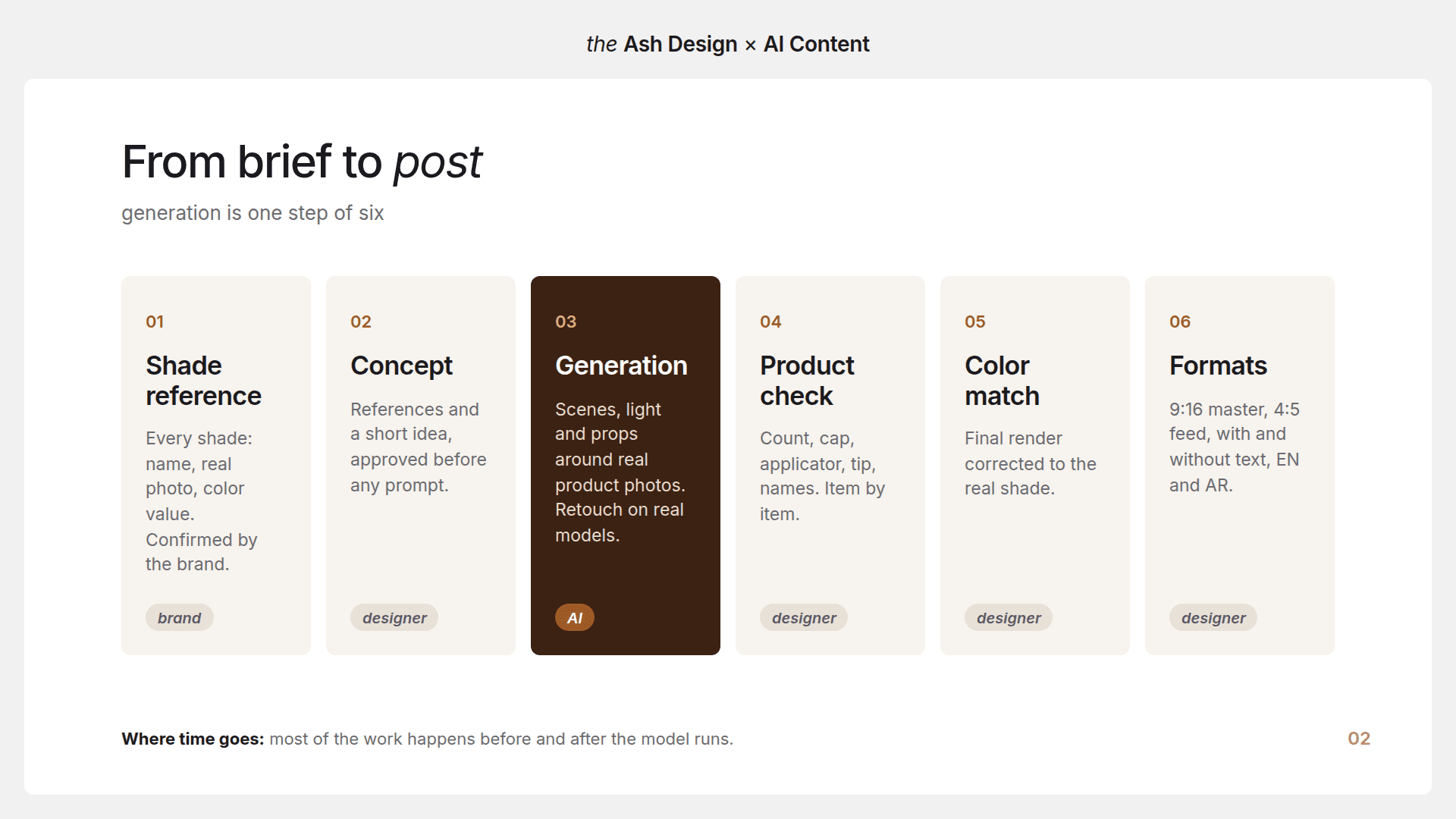
Six rules we now follow
1. The product is never generated
The product comes from real, approved photos. Every time. AI builds the world around it: the surface, the light, the fabric, the props, the season.
If there is no approved photo of a product, we ask for one. We do not fill the gap with a generated version, however close it looks.

2. One source of truth for shades
Before any visual is made, the brand confirms one reference: every shade, its exact name, a real photo and a color value. That reference is the only place shade names and colors come from, in the image and in the caption.
This also caught problems in the brand's own materials. The source folder had photos of the same liner with different tips and finishes. We flagged it with a short video walkthrough before it reached the website.

3. Concept before prompt
A prompt is not an idea. Generic prompts give generic images, and people recognize them.
Now every batch starts with references and a short concept, approved by the brand before anything is generated. For the end-of-summer campaign, "Back to Reality", we first shared references from leading beauty brands with notes on what to take from each. Only after the brand picked a direction did we build the posts.

4. Every visual is checked against the real lineup
Before anything goes to the client, a designer checks it against the product, item by item:
number of shades and products in the frame;
cap, bottle and applicator shape;
liner tip and texture;
shade color against the reference photo;
shade names and prices in the text;
logo, offer and legal text.
It takes minutes. It saves a revision round, and it saves trust.

5. Say what is generated
Some scenes are fully generated, and that is fine when everyone knows it. The brand asked for a bag with Sol d'Amore products spilling out of it, with a mirror and sunglasses. We made it fully in AI and told them up front that shades may drift slightly in this kind of image. The final render is then corrected to the real product color.
Being clear about this is what lets the client trust the parts that are not generated.
6. Real people where trust matters
On the website, the brand wanted its own model photos. Customers should not feel they are looking at AI.
So for the website banners, AI does not make the faces. It edits real photos, like a retoucher would.
A real example: the Pink October banner
For the Breast Cancer Awareness campaign, the brand sent new model photos and a reference for the look: pink eyeshadow and pink rhinestones on the face.

The first version put rhinestones in the hair too. It looked unreal, and the brand said so. We moved them to where makeup actually goes: the eyelids and down onto the cheekbone, with pink blush. A small pink ribbon under the eye was tried and then removed, because the banner looked cleaner without it.
That is the general lesson. AI edits look believable when they follow how makeup is really applied. Details that break physics read as fake immediately, even when people cannot say why.
The banner shipped in desktop and mobile sizes, with and without text, in English and Arabic.
Where AI earns its place, and where it does not
Backgrounds, surfaces, light, props: yes. Generated around a real product photo.
Seasonal and campaign scenes: yes. From an approved concept, then color-corrected.
Makeup looks on real model photos: yes, carefully. Retouching real photos, checked against how makeup is applied.
Fully generated lifestyle scenes: sometimes. Only when agreed, with shade drift flagged up front.
The product itself: no. Always from approved product photos.
Shade swatches: no. From real swatch photos and the shade reference.
Text, prices, offers, Arabic type: no. Set by a designer in Figma.
Building the feed
A launch feed made only of model shots feels heavy. One made only of product shots feels like a catalogue. We mixed four kinds of posts:
model close-ups with the product on the lips;
product still lifes with generated scenes and light;
texture and swatch posts, often as carousels, so people can swipe through shades;
typographic posts for launches and announcements, like "Something is coming" and "The wait is almost over".
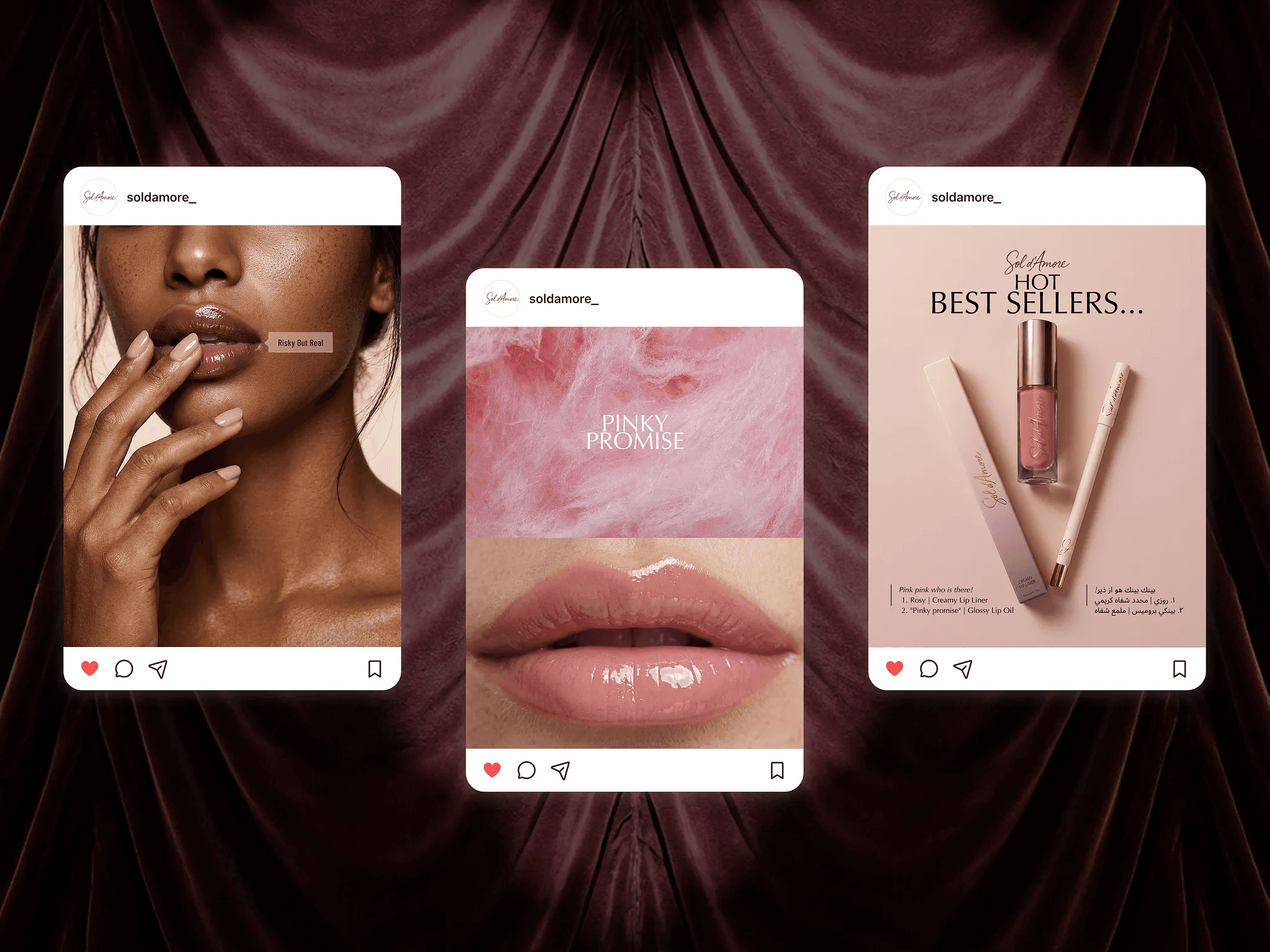
The brand planned the grid in rows of three, each row with a job: conversion, social proof and education. Carousels were used for shade ranges and tutorials, where swiping adds something.
Formats and delivery
Most AI content guides stop at the image. The work does not.
One master, planned for every placement. Snapchat is 9:16. The Instagram feed is 4:5 or 1:1. We design the vertical master with a safe zone in the middle, so the key message survives any crop.
With and without text. The brand often needs clean images for its store, ads and future posts. We deliver both.
Two languages. English and Arabic are laid out separately, not just translated in place.
Real numbers. Prices before and after, offer terms and promo codes are checked against the brand's own figures, because one wrong digit in an ad is a real problem.
A checklist before you publish AI content
Is the product in the frame a real photo, or checked against one?
Is the shade count right, and are the shade names exact?
Does the packaging match: cap, applicator, size, tip?
Do the colors match the reference photo on a calibrated screen?
Does every retouch follow how makeup is really applied?
Is every generated scene agreed with the brand?
Are prices, offers and codes correct in every language?
Is there a clean version without text?
If any answer is "no" or "not sure", it is not ready.

What AI changes, and what it does not
AI changed how fast we can try ideas. We can show a brand several campaign directions in a day, and a new season does not need a new photoshoot.
It did not remove the designer. It moved the designer's work from making every pixel to deciding which pixels can be trusted. For a beauty brand, that is most of the job.
FAQ
What is AI-generated content for social media?
It is imagery for posts, stories, ads and banners made or edited with generative AI, usually combined with real product and model photos. A designer sets the text, checks accuracy and exports every format.
Can AI generate product photos for a cosmetics brand?
We do not generate the product itself. Shade, packaging and texture must match what the customer receives, so the product always comes from approved photos. AI generates the scene around it and retouches real images.
How do you keep AI content on brand?
Start from an approved concept and references, not a prompt. Use one confirmed reference for shades and names. Check every visual against the real product before it goes to the client.
Will customers notice that images are AI?
They notice when details break reality: extra shades, wrong packaging, makeup in places it would never be. For website banners and trust-critical placements we work on real model photos and use AI as a retouching tool.
How much does AI-generated social media content cost?
It depends on volume and how much is generated. Our monthly AI content and social media retainers start from $500 per month. The price includes the designers' time and the generation tools and credits.
Related reading: Sol Cosmetics: Brand & Marketing System · Sol Cosmetics: E-Commerce Redesign
Need content that looks like your product, every time? We produce AI-generated content and social media design on a monthly retainer, reviewed by designers before release. Book a free intro call.